Straight2Bank
Money Safe
Protect your bank savings from scams
An extra layer of security to keep your savings secured

Social engineering
Cyber criminals often use social networks to gather your personal information, though social skills to win your trust and trick you into sending money or disclosing sensitive information.

Impersonation scam
Impersonation scam: Fraudster pretends to be government officials, organizations or someone you trust to convince you to send them money or disclose your personal or account information.
Phishing scam
Phishing scam: Phishing, as a form of social engineering, is a cyber crime where fraudsters try to obtain your personal information by email. Fraudster may also contact you through messaging apps, SMS or phone calls.
Malware attack
Malware attack: Malware is an intrusive programme installed on your computer or smartphone, often without your knowledge or permission.
What is social engineering?
Cyber criminals often employ the use of social networks to gather your personal information. Utilizing social skills, they will attempt to win your trust and trick you into sending money or disclosing sensitive information.
Fraudsters commonly use fake phone calls, text messages and emails impersonating government officials and organizations convincing you to give them sensitive information such as usernames, passwords and credit card details. Check out below for more information on different forms of social engineering.
What is impersonation?
There are many kinds of impersonation scams but they all work the same way: a scammer pretends to be legitimate government agencies, organizations or someone you trust to convince you to send them money or disclose sensitive information. Here are some types of scams that you should be aware of to better protect yourself.
What to watch out for:
What you can do:
What is phishing?
Phishing, a form of social engineering, is a cyber crime where fraudsters try to obtain your personal information by email. Fraudster may also contact you through messaging apps, SMS or phone calls. The information can be used for identity theft, payment scams and credit card fraud as well as many other forms of cybercrime. Malicious links or attachments are often included in phishing and vishing messages, designed to steal your information or infect your system with malware (malicious software).
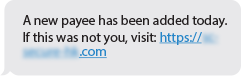
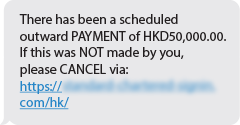
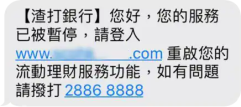
Watch out for cybercriminal! Here are the recent SMS Phishing attacks:
|
|
|
|---|---|---|
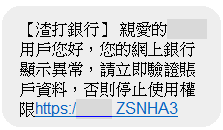 | 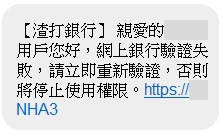 | 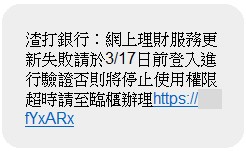 |
The above Phishing SMS messages make you feel suspicious and confused, which induce you to reply via hyperlinks. Never reply or click on any link in this type of SMS message. Clicking on the link or replying to this message could:
Five common characteristics of phishing messages:
What is malware?
Short for ‘malicious software’, malware is an intrusive programme installed on your computer or smartphone, often without your knowledge or permission. Once installed, it enables cyber criminals to commit fraud, like steal your banking credentials, run payment scams or hijack your system for a ransom.
Understand the common types of malware
Visit the sites below to learn how to protect yourself
Scameter
Scameter is the one-stop search engine, enter the platform to assess the risk of fraud and cyber security when you encounter suspicious calls, online sellers, job ads, etc.,
Hong Kong Monetary Authority
More smart tips provided by the HKMA against phishing SMS and Emails, and credit card scams.

Anti-Deception Coordination Centre
The Hong Kong Association of Banks
Learn practical tips from the HKAB’s Anti-Fraud video on identifying and combating potential scams
SMS & Email notification
We provide SMS, push notification and email alerts to notify you when important information changes or transactions are made using your account.

Monitoring and alert
Banking systems and transactions are continuously monitored by our security team to detect and respond to any threats or risks.

Cooling off period
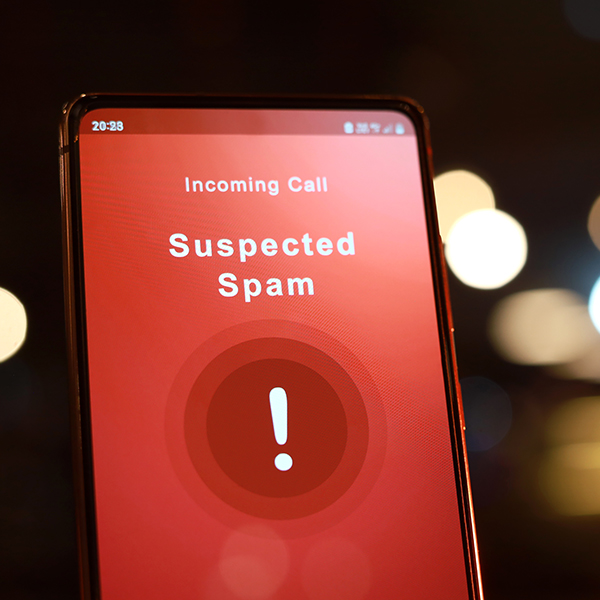
Suspected Scam
If you have any doubt with the payee details, or receive the alert message flagging the payee’s information as “High Risk” when making the transaction instruction, click here.
Online security
We manage the banking system with technical expert and advance technology to protect your online security.
Contact us
If you experience any of below, don’t hesitate to contact us.
Banking Industry Integrity Charter
The Charter encourages banks in integrity building and creates a platform for communication through public-private partnership, helping banks to implement effective integrity management and anti-corruption measures.
We better protect you through SMS & email notification by:
We maintain a secure system
Accounts are protected by a cooling-off period
After SC Mobile Key registration or re-registration and initiating identified high risk instructions (e.g. add new payee, fund / payment transfer, increase transfer limit, etc), your Digital Banking account may be suspended due to security reason. Please call our hotline 2886-8862 for identity verification. The bank will re-activate your Digital Banking account after verification, and you could re-initiate the instruction thereafter.
Suspected Scam / “High Risk”? Check it out with “Scameter”!
Click HERE to visit Scameter website of the Hong Kong Police Force.
As there is an increasing trend of fraud cases related to payments, remember to double check the transaction details and the payee is trustworthy before you proceed with the transaction.
If you have any doubt with the payee details, or receive the alert message flagging the payee’s information as “High Risk” when making the transaction instruction, you can visit the Scameter website of the Hong Kong Police Force to learn more.
To further enhance the ability of the Suspicious Account Alert in protecting our clients from fraud, a new 10 second countdown for “High Risk” alert will be added to the “Proceed” button whereby client must wait until the countdown reaches 0 before they can press “Proceed” to continue with the transaction.
Scameter is the one-stop search engine provided by the Police Force to help the public identify frauds and online pitfalls. When you encounter suspicious calls, online sellers, friend requests, job ads, investment websites, etc., you can enter the platform account name or number, payment account, phone number, email address, URL, etc. to assess the risk of fraud and cyber security.
Strong technical support
a. All data transferred between Standard Chartered and customers is protected with state-of-the-art 256-bit encryption. Even if the data is intercepted during transmission, advanced encryption technology ensures that outsiders cannot use it.
b. A strong firewall protects our banking systems from external threats and risks.
a. You can only try to log in three times. If you fail to log in three times, we will temporarily deactivate your account to prevent fraudsters from cracking your password. To reactivate, call the number on the back of your card or statement.
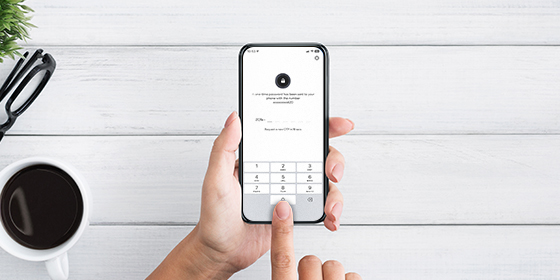
b. When you request the following services in Standard Chartered Bank Online Banking, the bank will request you to authenticate via SC Mobile Key or send a 6-digit one-time password (OTP) and some transaction details to your mobile phone via SMS
c. In some cases, we also require additional passwords for step-up authentication.
d. Advanced authentication technology ensures that only you, the authorized user, can connect to your account.
How we protect your data
a. We will never ask for your account information and password over the phone, email or text message.
b. Please note:
i. Messages without calling you by your name
ii. An email address that does not match the person or organization it purports to be
iii. Messages with poor spelling and grammar
iv. Messages claiming you have won a prize or instructing you to click on a link
v. We also will not direct you to a website to enter your username and password. Your password and PIN are private to you – never reveal them to anyone.
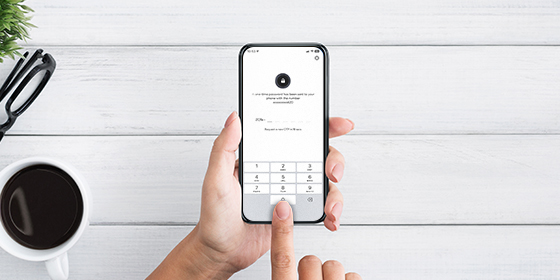
SC Mobile Key

Be aware and never share
Update your app and remember to log out
Regularly updating the apps and anti-virus software, and always logging out, helps keep you safe.
Always ensure your password is secure
Browse securely
Stay vigilant against Scam
Money Safe
Why you need to have SC Mobile Key
What should you do:
What should you do:
Tips for you to protect your PIN/password
Make sure you are browsing in a safe and secure environment.
More tips for you:
Remember, Standard Chartered will neither never request for your password or security information by phone call, email or SMS., nor do we notify anyone of account irregularities through pre-recorded voice messages. Also, we would not include hyperlinks in our communications (e.g. SMS or email) requesting you to log in to Online or Mobile Banking.