Standard Chartered Bank

SC Mobile HK

Standard Chartered Bank

FREE - In App Store

GET

SC Mobile HK

Standard Chartered Bank

FREE - In Google Play

GET

SC Mobile HK

Standard Chartered Bank

FREE - In App Gallery

GET

Online Banking FAQs – System Requirement


How can I enable TLS1.2 on web browsers for using online banking service?

If your web browser is…

Microsoft Edge


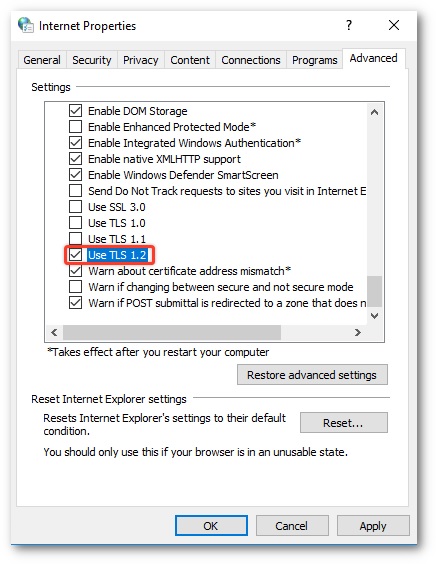
  1. Click the search icon (magnifying glass) In the Windows taskbar and type “internet options” in search box.
  2. Under Best match, click Internet Options.
  3. In the Internet Properties window, on the Advanced tab, scroll down to the Security section.
  4. Check the User TLS 1.2 checkbox.
  5. Click OK.
  6. Close your browser and restart Microsoft Edge browser.
 

Google Chrome


  1. Open Google Chrome
  2. Click Alt F and select Settings
  3. Scroll down and select Advanced 
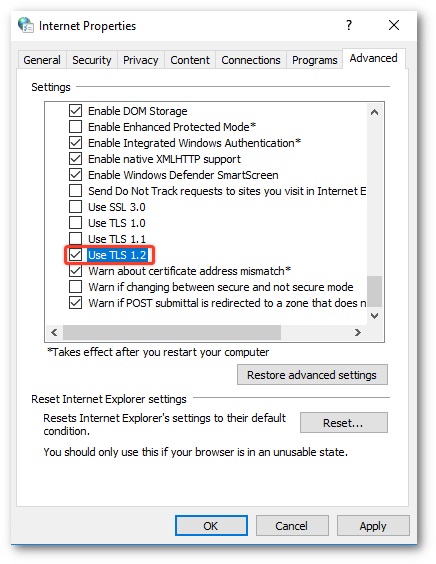
  4. Scroll down to the System section and click on Open proxy settings
  5. Select the Advanced tab
  6. Scroll down to the Security category, locate and check the option box Use TLS 1.2
  7. Click OK
  8. Close your browser and restart Google Chrome


Mozilla Firefox


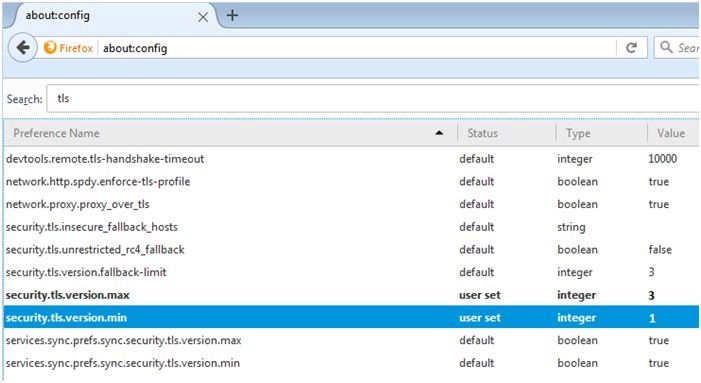
  1. Open Firefox
  2. In the address bar, type about:config and press Enter
  3. In the Search field, enter tls. Find and double-click the entry for security.tls.version.max
  4. Set the integer value to 3 to force protocol of TLS 1.2 to be the default.
  5. Click OK
  6. Close your browser and restart Mozilla Firefox


Apple Safari


There are no options for enabling SSL protocols. If you are using Safari version 7 or greater, TLS 1.1 and TLS 1.2 are automatically enabled.


Stacy
Log Out
登出
Need help?